SPECstorage™ Solution 2020_eda_blended Result
Copyright © 2016-2026 Standard Performance Evaluation Corporation
|
SPECstorage™ Solution 2020_eda_blended ResultCopyright © 2016-2026 Standard Performance Evaluation Corporation |
| Microsoft and NetApp Inc. | SPECstorage Solution 2020_eda_blended = 5340 Job_Sets |
|---|---|
| Azure NetApp Files large volume breakthrough mode (Aug 2026) | Overall Response Time = 0.54 msec |
|

|
| Azure NetApp Files large volume breakthrough mode (Aug 2026) | |
|---|---|
| Tested by | Microsoft and NetApp Inc. | Hardware Available | August 2026 | Software Available | May 2026 | Date Tested | August 2026 | License Number | 33 | Licensee Locations | San Jose, CA USA |
Azure NetApp Files is an Azure native, first-party, enterprise-class, high-performance file storage service. It provides Volumes as a service, which you can create within a NetApp account and a capacity pool, and share to clients using SMB and NFS. You can also select service and performance levels and manage data protection. You can create and manage high-performance, highly available, and scalable file shares by using the same protocols and tools that you're familiar with and rely on on-premises.
| Item No | Qty | Type | Vendor | Model/Name | Description |
|---|---|---|---|---|---|
| 1 | 1 | Storage Service | Microsoft | Azure NetApp Files large volume breakthrough mode | Azure NetApp Files large volumes can support from 50 TiB to 2 PiB in size. Breakthrough mode enables individual volumes to scale beyond 12.5 GiB/s. Volumes can be resized up or down on demand, and throughput can be adjusted automatically (based on volume size) or manually depending on the capacity pool QoS type. |
| 2 | 48 | Azure Virtual Machine | Microsoft | Standard_E8_v5 | Red Hat Enterprise Linux running on 48 Azure E8_v5 Virtual Machines (8 vCPU, 64 GiB Memory, 1x Virtual NIC supporting up to 12.5 Gbps egress network bandwidth). Each workload client mounted the Azure NetApp Files large volume once over NFSv3. |
| 3 | 1 | Azure Virtual Machine | Microsoft | Standard_D2s_v5 | (Prime Client) Red Hat Enterprise Linux running on an Azure D2s_v5 Virtual Machine (2 vCPU, 8 GiB Memory, 1x Virtual NIC supporting up to 12.5 Gbps egress network bandwidth). |
| Item No | Component | Type | Name and Version | Description |
|---|---|---|---|---|
| 1 | RHEL 9.8 | Operating System | RHEL 9.8, kernel 5.14.0-687.41.1.el9_8.x86_64 | Operating System (OS) for the workload clients |
| Client Network Settings | Parameter Name | Value | Description |
|---|---|---|
| Accelerated Networking | Enabled | Accelerated Networking enables single root I/O virtualization (SR-IOV) on supported virtual machine (VM) types | Storage Network Settings | Parameter Name | Value | Description |
| Network features | Standard | Standard Network Features allows Azure VNet features such as network security groups, user-defined routes and others. |
None
| Clients | Parameter Name | Value | Description |
|---|---|---|
| rsize,wsize | 262144 | NFS mount options for data block size |
| protocol | tcp | NFS mount options for protocol |
| vers | 3 | NFS mount options for NFS version |
| nconnect | 8 | NFS mount options for multiple TCP connections |
| actimeo | 600 | NFS mount option to modify the timeouts for attribute caching |
| nocto | present (boolean) | NFS mount option to turn off close-to-open consistency |
| noatime | present (boolean) | NFS mount option to turn off access time updates |
| nofile | 102400 | Maximum number of open files per user |
| nproc | 10240 | Maximum number of processes per user |
| sunrpc.tcp_slot_table_entries | 128 | Sets the number of (TCP) RPC entries to pre-allocate for in-flight RPC requests |
| net.core.wmem_max | 16777216 | Maximum size of the socket send buffer |
| net.core.rmem_max | 16777216 | Maximum size of the socket receive buffer |
| net.core.wmem_default | 1048576 | Default setting in bytes of the socket send buffer |
| net.core.rmem_default | 1048576 | Default setting in bytes of the socket receive buffer |
| net.ipv4.tcp_rmem | 1048576 8388608 33554432 | Minimum, default and maximum size of the TCP receive buffer |
| net.ipv4.tcp_wmem | 1048576 8388608 33554432 | Minimum, default and maximum size of the TCP send buffer |
| net.core.optmem_max | 4194304 | Maximum ancillary buffer size allowed per socket |
| net.core.somaxconn | 65535 | Maximum tcp backlog an application can request |
| net.ipv4.tcp_mem | 4096 89600 8388608 | Maximum memory in 4096-byte pages across all TCP applications. Contains minimum, pressure and maximum. |
| net.ipv4.tcp_window_scaling | 1 | Enable TCP window scaling |
| net.ipv4.tcp_timestamps | 0 | Turn off timestamps to reduce performance spikes related to timestamp generation |
| net.ipv4.tcp_no_metrics_save | 1 | Prevent TCP from caching connection metrics on closing connections |
| net.ipv4.route.flush | 1 | Flush the routing cache |
| net.ipv4.tcp_low_latency | 1 | Allows TCP to make decisions to prefer lower latency instead of maximizing network throughput. * See Note below |
| net.ipv4.ip_local_port_range | 1024 65000 | Defines the local port range that is used by TCP and UDP traffic to choose the local port. |
| net.ipv4.tcp_slow_start_after_idle | 0 | Congestion window will not be timed out after an idle period |
| net.core.netdev_max_backlog | 300000 | Sets maximum number of packets, queued on the input side, when the interface receives packets faster than kernel can process |
| net.ipv4.tcp_sack | 0 | Disable TCP selective acknowledgements |
| net.ipv4.tcp_dsack | 0 | Disable duplicate SACKs |
| net.ipv4.tcp_fack | 0 | Disable forward acknowledgement. * See Note below |
| vm.dirty_expire_centisecs | 30000 | Defines when dirty data is old enough to be eligible for writeout by the kernel flusher threads. Unit is 100ths of a second. |
| vm.dirty_writeback_centisecs | 30000 | Defines a time interval between periodic wake-ups of the kernel threads responsible for writing dirty data to hard-disk. Unit is 100ths of a second. |
Tuned the necessary client parameters as shown above, for communication between clients and storage over Azure Virtual Networking, to optimize data transfer and minimize overhead. < br /> Note - net.ipv4.tcp_low_latency and net.ipv4.tcp_fack are obsolete in Linux 4.14 and later but were configured during the test.
| Item No | Description | Data Protection | Stable Storage | Qty |
|---|---|---|---|---|
| 1 | Azure NetApp Files large volume, Flexible Service Level, 150 TiB, 57,600 provisioned MiB/s | Azure NetApp Files Flexible, Standard, Premium and Ultra service levels are built on a fault-tolerant bare-metal fleet powered by ONTAP, delivering enterprise-grade resilience, and uses RAID-DP (Double Parity RAID) to safeguard data against disk failures. This mechanism distributes parity across multiple disks, enabling seamless data recovery even if two disks fail simultaneously. RAID-DP has a long-standing presence in the enterprise storage industry and is recognized for its proven reliability and fault tolerance. | Stable Storage | 1 |
| Number of Filesystems | 1 | Total Capacity | 150 TiB | Filesystem Type | Azure NetApp Files large volume |
|---|
The large volume was created via the public Azure API using the Azure CLI.
Creation commands are available here: https://learn.microsoft.com/en-us/cli/azure/netappfiles/volume?view=azure-cli-latest#az-netappfiles-volume-create
Creating the Azure NetApp Files Account: az netappfiles account create
--account-name [account-name] --resource-group [resource-group] --location
[location]
Creating the Azure NetApp Files Capacity Pool:
az netappfiles pool create --account-name [account-name] --resource-group
[resource-group] --location [location] --pool-name [pool-name] --service-level
Flexible --size 164926744166400 --CustomThroughputMibps 57600
Creating the Azure NetApp Files Volume: az netappfiles volume create
--account-name [account-name] --file-path [mount-point] --name [volume-name]
--pool-name [pool-name] --resource-group [resource-group] --location [location]
--protocol-types NFSv3 --vnet [vnet-id] --subnet [subnet-id] --zones 1
--service-level Flexible --network-features Standard --is-large-volume true
--usage-threshold 153600 --throughput-mibps 57600 --breakthrough-mode
Enabled
The provisioned throughput (57,600 MiB/s) is the volume's configured maximum; actual maximum achievable throughput depends on the workload.
| Item No | Transport Type | Number of Ports Used | Notes |
|---|---|---|---|
| 1 | Virtual NIC | 48 | Each of the 48 workload Linux Virtual Machines has a single Network Adapter supporting up to 12.5 Gbps egress network bandwidth with Accelerated Networking enabled. |
| 2 | Virtual NIC | 1 | The Prime client has a single Network Adapter supporting up to 12.5 Gbps egress network bandwidth with Accelerated Networking enabled. |
Azure Virtual machines bandwidth limits egress (outbound) traffic from each virtual machine up to 12.5 Gbps. The virtual machines ingress bandwidth rates may exceed the documented limit depending on other resources available to the virtual machine (https://learn.microsoft.com/en-us/azure/virtual-network/virtual-machine-network-throughput)
| Item No | Switch Name | Switch Type | Total Port Count | Used Port Count | Notes |
|---|---|---|---|---|---|
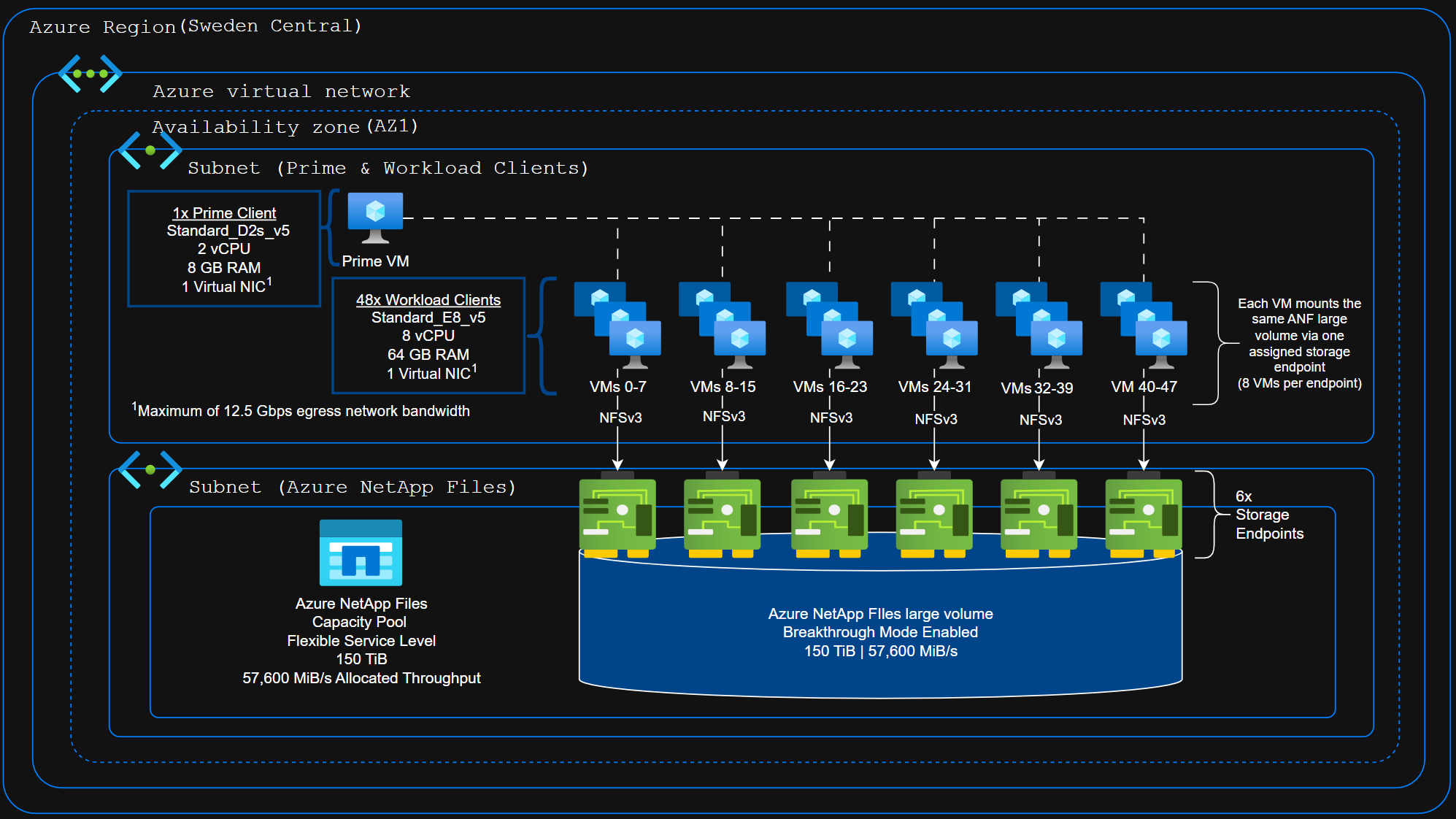
| 1 | Azure Virtual Network - Sweden Central region - AZ1 | Virtual Network | 55 | 55 | The Azure virtual network had 6 connections for the Azure NetApp Files storage endpoints, 1 connection for the Prime client, and 48 (1 per) RHEL client VMs. Azure virtual networks allow up to 65,536 Network interface cards and Private IP addresses per virtual network. |
| Item No | Qty | Type | Location | Description | Processing Function |
|---|---|---|---|---|---|
| 1 | 384 | vCPU | Azure Cloud | Intel(R) Xeon(R) Platinum 8573C CPU @ 3.50GHz (8 cores allocated to each of the 48 Workload VMs) | Client Workload Generator |
| 2 | 2 | vCPU | Azure Cloud | Intel(R) Xeon(R) Platinum 8370C CPU @ 2.80GHz (2 cores allocated to Prime VM) | Prime Client |
n/a
| Description | Size in GiB | Number of Instances | Nonvolatile | Total GiB |
|---|---|---|---|---|
| Client Workload Generator | 64 | 48 | V | 3072 |
| Prime Client | 8 | 1 | V | 8 | Grand Total Memory Gibibytes | 3080 |
n/a
Azure NetApp Files utilizes non-volatile battery-backed memory of two independent nodes as write caching prior to write acknowledgement. This protects the filesystem from any single-point-of-failure until the data is de-staged to disks. In the event of an abrupt failure, pending data in the non-volatile battery-backed memory is replayed to disk upon restoration.
Each client was round-robin assigned and mounted NFSv3 to one of six storage
endpoints for the Azure NetApp Files large volume. Each storage endpoint has 8
workload VMs connected.
Unlike a general-purpose operating system, Azure
NetApp Files does not provide mechanisms for customers to run third-party code
(https://learn.microsoft.com/en-us/security/benchmark/azure/baselines/azure-netapp-files-security-baseline?toc=/azure/azure-netapp-files/TOC.json#security-profile).
Azure Resource Manager allows only an allow-listed set of operations to be
executed via the Azure APIs (https://learn.microsoft.com/en-us/azure/azure-netapp-files/control-plane-security).
Underlying Azure infrastructure was patched for Spectre/Meltdown on or prior
to January 2018. (https://azure.microsoft.com/en-us/blog/securing-azure-customers-from-cpu-vulnerability/
and https://learn.microsoft.com/en-us/azure/virtual-machines/mitigate-spectre).
n/a
48 clients were used to generate the workload plus 1 prime client.
Each
workload client used a single virtual network adapter, through a single vnet
connected to an Azure NetApp Files endpoint. Each client mounted one ANF large
volume as an NFSv3 filesystem within the same Azure Region/availability
zone.
Breakthrough mode enables six network endpoints per volume. The
clients were round robin assigned to the available endpoints.
There is 1 mount per client, mounted at /mnt/eda on all 48 workload clients as
listed in the CLIENT_MOUNTPOINTS line of the RC file. Example /etc/fstab
entry:
10.0.10.4:/breakthrough-perf-test-lv /mnt/eda nfs
hard,proto=tcp,vers=3,rsize=262144,wsize=262144,nconnect=8,nocto,noatime,actimeo=600
0 0
None
Generated on Mon Sep 14 16:28:53 2026 by SpecReport
Copyright © 2016-2026 Standard Performance Evaluation Corporation